Template guides / Particle Torus
Particle Torus
Make a rotating particle torus with adjustable ring and tube radii, color movement and framing.
Open Particle Torus in editor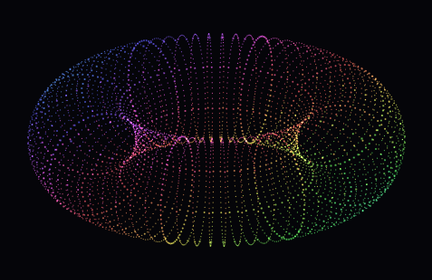
What you are seeing
A torus is a tube curved into a closed ring. Its central opening and curved surface create a readable rotating subject for motion backgrounds and visual loops. Changing the tube thickness produces a different silhouette without changing to another template.
Try it in the editor
- Begin with Studio torus to see the default balance of opening and surface.
- Compare Thin ring and Wide torus before adjusting individual controls.
- Adjust ring and tube radius together: preserve a clear central opening if you want an airy form.
- Choose a viewing tilt and slower rotation, then check the full turn for cropping before exporting.
Controls that make a difference
- Ring radius
- Use 120–260 to change the radius of the tube’s circular path. Larger values spread the subject outward.
- Tube radius
- Use 20–100 to change tube thickness. A thick tube fills more of the frame and reduces the visible opening.
- Tilt and scale
- Tilt changes how round or narrow the opening appears. Scale fits the complete turn within the portrait canvas.
- Color flow
- Adjust color speed independently of rotation. The White torus preset is useful when you want to focus on motion and silhouette.
What to keep in mind
The central opening may disappear in an edge-on projection even when the geometry has a hole. Browser recording performance depends on particle density and device speed.
Save and export
The editor saves drafts in this browser. Download a project JSON file to keep a portable backup; clearing site data removes local drafts. Opening a template guide’s editor link restores that template’s saved draft when available.
PNG exports capture the selected frame at 540 × 960, 1080 × 1920 or 2160 × 3840. Browser video recording is silent, with 720p or 1080p portrait output and a target of 30 fps. MP4 or WebM availability depends on your browser. Keep the tab visible; recording is limited to 60 seconds and does not guarantee exact timing, frame rate or a seamless loop.
Use material you have permission to use. A template’s availability does not grant rights to third-party music, branding or reference works.