Template guides / Möbius Band
Möbius Band
Create a rotating particle Möbius band. Explore ribbon width, ring radius and one, three or five half twists.
Open Möbius Band in editor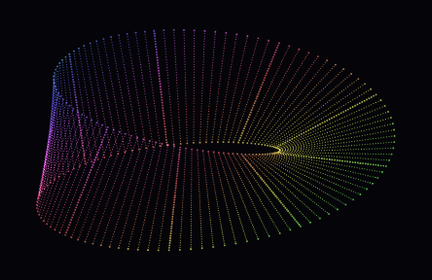
What you are seeing
A Möbius band joins a ribbon after an odd number of half twists. Following its surface carries you around a single continuous side. This particle rendering makes the changing outline visible as the band rotates; a still preview cannot show the full path around the surface.
Try it in the editor
- Start with One-sided band to inspect the classic single half twist.
- Try Narrow ribbon to expose more of the opening and separate the crossing edges.
- Choose Three half twists to compare a more folded silhouette with the first version.
- Adjust the viewing tilt so the opening remains visible, then record a slow turn.
Controls that make a difference
- Ring radius
- Use 130–260 to change the size of the central path. Check the framing after increasing it.
- Band half width
- Use 20–100 to set the width on either side of the ribbon’s centerline. A broad band emphasizes the surface but can overlap more strongly.
- Half twists
- Choose one, three or five. These odd twist counts produce increasingly folded ribbon shapes.
- Rotation and color flow
- Motion and color have separate controls. Slow the rotation to reveal the ribbon shape without stopping the color movement.
What to keep in mind
The animation is a projected particle representation, not a physical simulation or a topology measurement. Dense overlap can make the surface difficult to follow; reduce width or adjust tilt.
Save and export
The editor saves drafts in this browser. Download a project JSON file to keep a portable backup; clearing site data removes local drafts. Opening a template guide’s editor link restores that template’s saved draft when available.
PNG exports capture the selected frame at 540 × 960, 1080 × 1920 or 2160 × 3840. Browser video recording is silent, with 720p or 1080p portrait output and a target of 30 fps. MP4 or WebM availability depends on your browser. Keep the tab visible; recording is limited to 60 seconds and does not guarantee exact timing, frame rate or a seamless loop.
Use material you have permission to use. A template’s availability does not grant rights to third-party music, branding or reference works.
Explore another shape
Particle Cube · Particle Letters · Dual Axis · Particle Torus